
Yes - schools can choose to pay by invoice (BACS) at checkout. Follow the steps below to select this payment method when placing your order.
How to select invoice payment at checkout?
-
Add your items to your basket and proceed to checkout.
-
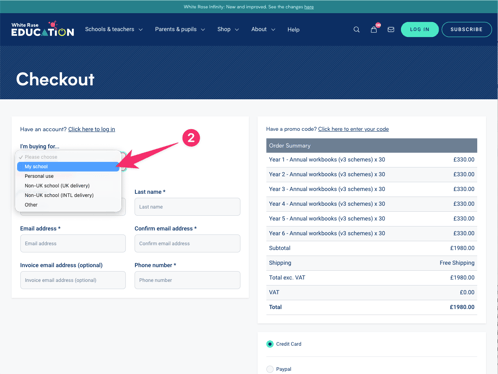
At the top of the checkout form on the left, you will see "I'm buying for..." with a dropdown menu. Select My school from the options.
-
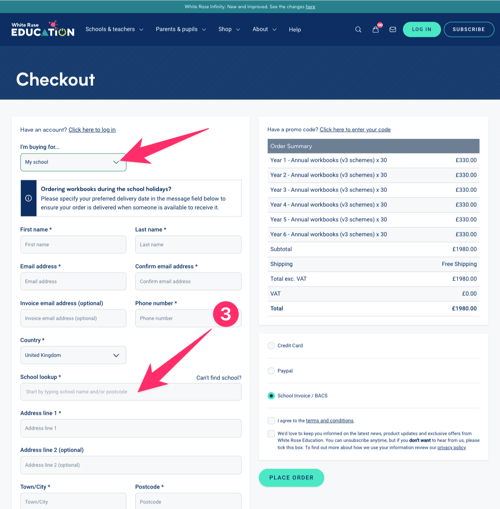
Once My school is selected, the checkout form will expand to include your school details - complete these as prompted, including the school lookup and address fields.
-
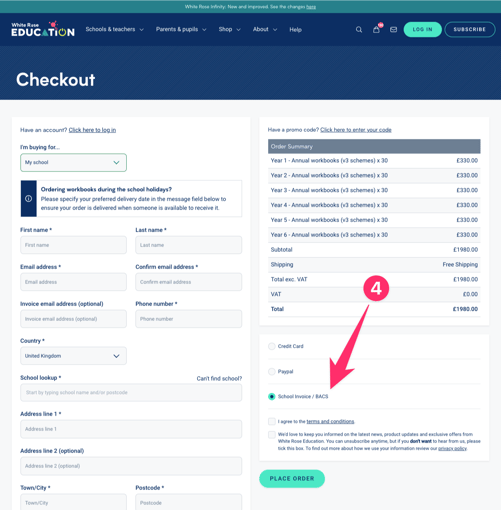
On the right-hand side of the checkout page, you will see the payment options. Select School Invoice / BACS.
-
Complete the rest of the checkout form and click Place Order.
An order confirmation screen will appear, and a formal invoice will be raised and sent to you within 5 working days.
Please note: If you wish to add a Purchase Order (PO) number to your order, you can do this in the Message (optional) field at the bottom of the checkout form. See [How do I add a PO number to my order?] for guidance.