
If your school requires a Purchase Order (PO) number on your invoice, you can add this during checkout when selecting invoice payment. Follow the steps below.
Adding a PO number at checkout
-
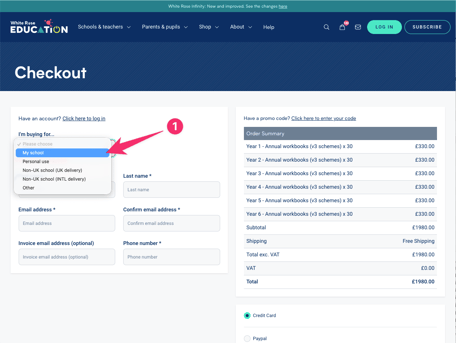
At the top of the checkout form, select My school from the "I'm buying for..." dropdown.
-
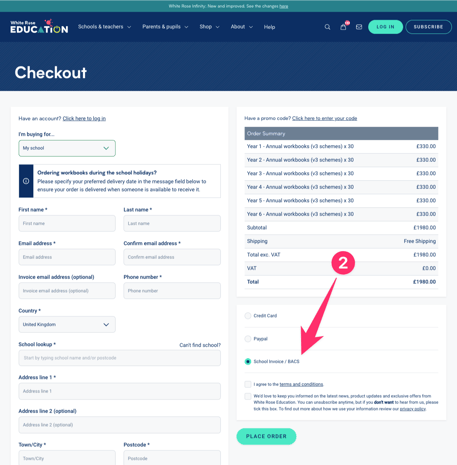
On the right-hand side of the page, select School Invoice / BACS as your payment method.
-
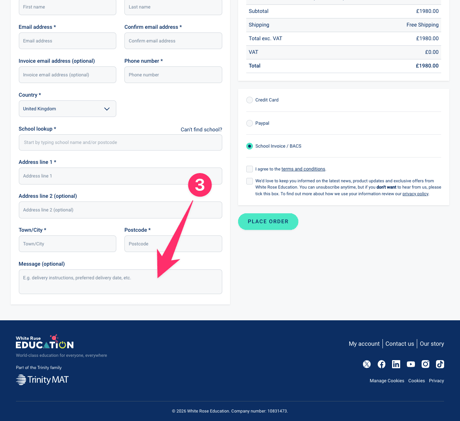
Complete the checkout form, then scroll to the bottom of the left-hand form area.
-
Locate the Message (optional) field and enter your PO number here.
-
Click Place Order. Your PO number will be picked up by the finance team when your invoice is raised.
Already placed your order without a PO number?
If your order has already been placed and you didn't include a PO number, please email it to us at accounts@whiterosemaths.com and our team will add it to your invoice manually.