
If you paid for your order online using a credit or debit card or PayPal, you can download your receipt (invoice) directly from your White Rose Education account at any time. Please note that this process applies to card and PayPal payments only - if your order was placed on invoice, please see [How do I get a copy of my invoice?].
Steps to download your receipt
-
Go to whiteroseeducation.com and sign in to your account.
-
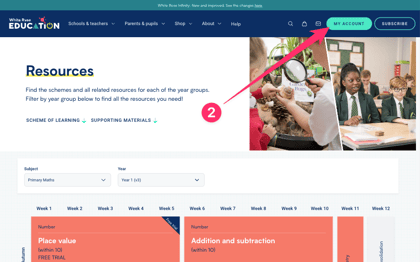
Select My Account in the top-right corner of the page.
-
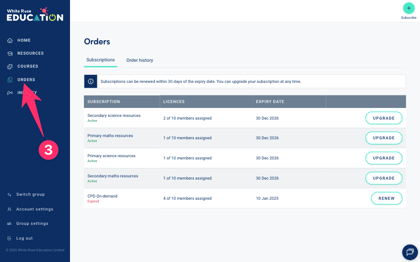
In the left-hand sidebar, select Orders.
-
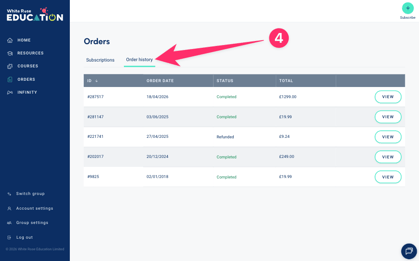
Select the Order History tab.
-
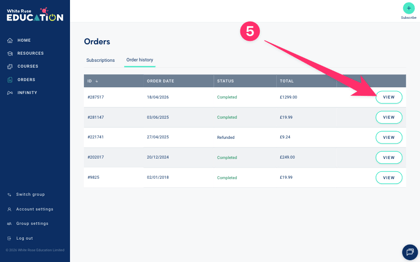
Find the order you need a receipt for and click View.
-
Select Download Invoice to save your receipt as a PDF.
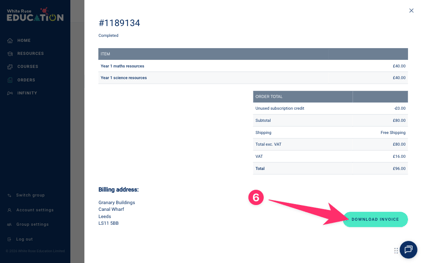
Your receipt will download as a PDF and can be used as a VAT receipt or tax receipt for your records.
Need help? If you're unable to locate your receipt or your order was not paid by card or PayPal, please contact us at accounts@whiterosemaths.com.