
You can now enjoy enhanced security on your White Rose Education account. To help keep your information safe, your account will remain active on one device and browser at a time, reducing the risk of unauthorised access.
You’re still free to use multiple tabs and windows within the same browser without any interruption, so your experience stays smooth and flexible.
If you’re ever returned to the login page with a message that your account is in use elsewhere, it simply means your account has been accessed from another device, browser, or private browsing session.
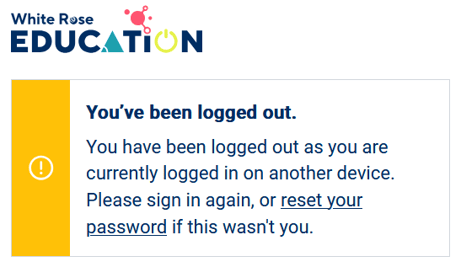
What to do next?
If it was you who logged in, simply log back in to your account on your preferred device.
If it wasn’t you who logged in, we recommend changing your password to keep you account secure.
You can update your password while logged in by selecting ‘Account settings’ from the blue menu bar in My account.
Click the ‘Your password’ tab then enter your current password followed by your new chosen password.
To help keep your account secure, your password should be at least 8 characters long and include a mix of uppercase and lowercase letters, plus a number.
Confirm your new password and click ‘Update’ to save the change.
A few extra tips for managing access smoothly
If your White Rose Education account uses a shared email address (such as admin, finance, or orders) for managing subscriptions or placing orders, that’s absolutely fine. To avoid any interruptions, we’d recommend coordinating internally so that only one person is logged in at a time.
If your account isn’t linked to your current email address, you can either update it or create a new account using your own individual email address.
If multiple people are currently using the same account to access resources, each person will need their own account to ensure secure and uninterrupted access.
To create a new account, register here and then ask a Manager in your group to invite you to join your membership group.
When inviting a new user, remember to assign any subscription access they need and give Manager access if they’ll be placing orders or managing subscriptions.